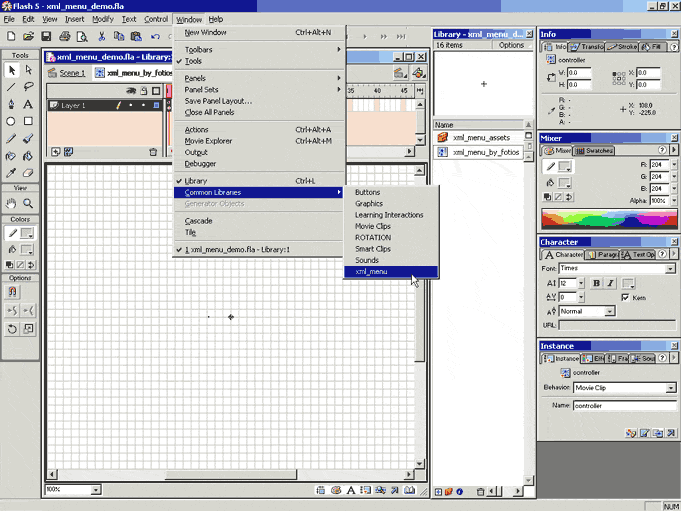
What the smart clip's fla looks like in the flash development environment. Note the already installed xml_menu extension that appears as another common libraries element.
A couple of days ago I finished coding the xml_menu smart clip which I packaged and submitted, as a Flash extension, to Macromedia. This tutorial is meant to give some idea, to anyone interested, of how such a menu system can be built using Flash's ActionScript. Full code of the smart clip is available when you download the xml_menu Flash extension from the Macromedia site; this tutorial will only present the portions of code that constitute the heart of the smart clip. The following paragraphs give you some idea of what xml_menu does. The rest of the sections in this page explain how it is done (don't expect anything close to a 'step by step newbie guide though).
The xml_menu smart clip creates a hierarchical
menu system (windows style) based on an external XML file that can be accessed
locally or through the Internet. The URL path to the XML file containing the
menu's specification is the only parameter that you need to pass to the smart
clip's instance via its "clip parameters" panel. The smart clip provides
it's own clip parameters mini UI (User Interface) for easy entry of the URL
path to the XML file.
The menu's positioning, appearance and behavior are highly customizable via
property values specified within the xml file (as parameters of the root node
tag). Menu items can be linked to other web pages or to internal actionscript
functions (placed at the root of the movie or movie clip that contains the smart
clip instance). Whether a menu item links to a web page (a URL) or an internal
actionscript function depends on the value of the calltype parameter
of the item's respective XML node.
The xml_menu in action
The basic features of the xml_menu smart clip are:
The XML data is brought in and parsed with a myXMLobject.load() type of call. After that it remains in memory as a standard W3C DOM tree that can be easily accessed via DOM API calls.
Every time the user rolls over a menu element, the button within the "el" clip detects it and among other things (like lighting up to show that it is activated) it calls the walkTree() function that resides at the root of the smart clip. This function is recursive and it basically walks the tree until it finds a tree node by the name of its 'name' passed argument. When it does, it sets the 'found' root var to the name of the found node and sets the 'node_level' clip root var to the number that corresponds to the depth of the found node. It can do that because it always starts from the root of the tree (and with level == 0) and counts levels every time it goes deeper in the structure. Other existing menu item clips know whether they should keep displaying or remove themselves because they are constantly monitoring this 'node_level' value (along with which the active parent node clip is).
Here is the full code of the walkTree() function that constitutes the most important piece of code in the smart clip. walkTree() walks the sibling nodes of the current node and if a sibling has children, it calls itself in order to do the same with the next level of the tree.
////////////////////////////////////////////////////
function walkTree(start, name, level)
{
var sib = start.firstChild;
while (sib)
{
if (sib.attributes.name == name)
{
found = sib;
node_level = level;
return;
}
else if (sib.hasChildNodes())
walkTree(sib, name, level + 1);
sib = sib.nextSibling;
}
}
////////////////////////////////////////////////////
When coding a smart clip the most important thing to remember is that all references to other clips have to be relative. Specifically no _root or _level type of paths should be used. _parent or nested _parent references (e.g. _parent._parent_parent) should be used instead along with the this reference which is the best way to access the current clip.
The reason we need the smart clip to use relative addressing is because we don't know where the user will place its instance; at the _root of a movie or within another movie clip.
What the smart
clip's fla looks like in the flash development environment. Note the already
installed xml_menu extension that appears as another common libraries element.
The xml_menu smart clip uses the following basic layout:
The user should be continually and intuitively informed by the GUI's visual display cues of the menu's state. The menu's basic taxonomy, as visually exemplified by levels of stacked selectable buttons, accomplishes this to a degree. However, with complex menu systems it needs to be complemented by a system that will, as intuitively as possible, inform the user of the current path of navigation in a fully expanded and complex menu state. What this means is that it should be very easy to determine, at any moment, to which parent node another node belongs. The design decision to have a child menu level begin vertically at it's parent's y coordinate is not enough. We need something faster; we need the arrow of each active parent menu clip to change color! This is accomplished with the regressRed() function that resides at the root of the "el" movie clip.
What the regressRed() function does is light up the active arrow clip of the current "el" instance and then travel back the current menu navigation path, effectively calling itself in other "el" instances it finds along this path. The result is a "snake path" of menu elements with lighted "active" arrows that is very natural for the user to follow with his/her eyes. I named this function "regressRed()" because initially the active arrow was a standard color of red. However, later on I turned this color into another of the numerous parameters that the xml_menu smart clip receives (you can see the complete list of parameters in the documentation of the xml_menu extension) and therefore this part of the function name is not part of its functional description any more, just part of its history. Here is the simple yet elegant code:
function regressRed(val)
{
if (!leaf)
showredarrow = val;
if (parent_node != null)
_parent[parent_node].regressRed(val);
}
val may be 0 or 1 for "turn off" and "turn on" respectively. The "Turn on" snaky regression is triggered on rollOver of the button within the menu element's "el" clip instance, the "turn off" is triggered on rollOut.
Well, those were the most important (and pretty) pieces of code in the xml_menu smart clip. However, to make the smart clip really work as expected, a lot more code is needed. You can view this code when you download and install the xml_menu extension; however, it is complicated (although I have added some explanatory comments), mundane and a bit ad hoc at places. Keep in mind that there are more than one ways to build a menu system like this and mine is just one of them. In retrospect, it is not even the best that I can think of. However, it does work well.
Fotios is a lone programmer devoted to freedom of speech, ideas and code. He currently exists alone in the Scottish wasteland and lives off freelance projects, that he takes up now and then, and part time bouncing for local pubs and clubs. His dream is to one day become a full time systems programmer for a major company and part time bouncer for a topless or all-nude joint in New York City.
Developer contact: fotios@altavista.net
Developer site: http://fotios.cc