The Internet is fast becoming the primary medium for human communication - both business related and personal. However, this medium presents serious security challenges that mainly stem from the fact that although it is much more complex and powerful than traditional communications media, the opportunities, for phenomenal corporate profits, that it presents have driven pioneering companies in the field to quickly (and sometimes irresponsibly) adopt and disseminate:
At the end of the 20th century, Internet security technologies started enjoying wider acceptance and penetration in the PC market - the market that is of interest to the average citizen. Today, more than ever, software that promises strong security and has the technological muscle to deliver it, is available in the market. A lot of this software is freeware. Secret Love is the latest addition to the growing number of freeware applications that offer strong security services to the average citizen.
"Secret Love" is a temporary and tentatively humorous name for the Alpha 1 version of a "peer-to-peer chat" type of desktop application for win32 boxes that utilizes strong encryption to encode exchanged messages - thus guaranteeing the privacy of the contained information to a significant degree.
Secret Love is a multithreaded TCP/IP application that makes use of MFC, winsock, CryptoAPI and low level win32 APIs (threads, synchronization, etc.) In future versions Secret Love will also offer strong authentication and non-repudiation services.
"Secret Love" is being developed by the coders at Weird Computing Inc (currently only one coder by the name of Fotios). The guys at Weird Computing are dedicated to protecting the body, mind and psyche of citizens, cattle and other unfortunate creatures - we are vegetarian coders.
The purpose of Secret Love is manifold:
Here is what the "Secret Love" application window looks like:
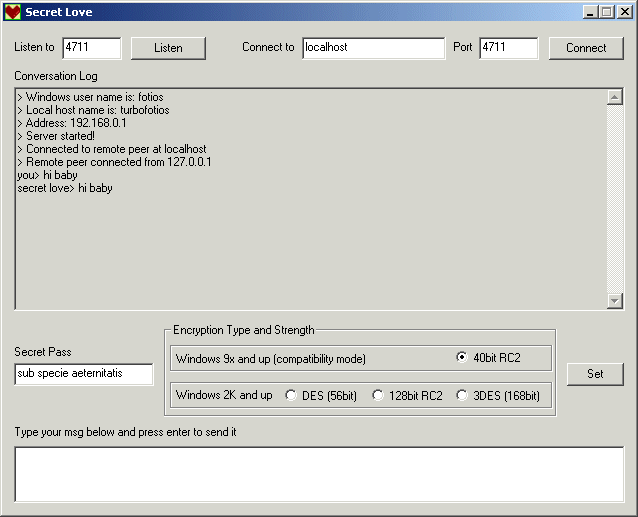
SL uses two sockets to communicate with a peer - a copy of itself. Each socket is on a separate thread - there is a server thread and a client thread. It starts by binding a socket and listening at a customizable port on your local IP address. Then the user enters an IP address or domain name and the port that the peer on that address will be listening at. Pressing the "Connect" button creates a second socket and connects it to the remote ip:port. Once a non busy listening client receives a connection it responds by connecting its own client socket to the remote IP (and the specified remote peer server port which you still need to know).
The full-duplex functionality of both sockets is reserved for the implementation of the application level protocol - for the time being messages are exchanged as plain text with \x0D\x0A message delimiters.
The application achieves responsiveness and efficiency by using multithreading. Thread shared resources - like the chat conversation log - are secured from corruption via the use of critical sections. The interface is implemented using an MFC CDialog subclass. No MFC threads or MFC sockets are used. This is done deliberately in order to retain freedom of coding expression and demonstrate knowledge of low level winsock and thread coding.
Encryption is done using Microsoft's comprehensive CryptoAPI.
Custom classes are implemented to encapsulate low level structures and functions (e.g. there is a custom socket class)
SL has been tested successfully behind a NATing ISA firewall. Of course you will need to publish your server port and put together a protocol definition that will allow the internal client to connect to the remote peer's open port. Using SL on the firewall box itself will require definition of appropriate packet filters.
Here is a snippet of code that demonstrates a polling interaction between two threads.
The GUI thread delivers the message, that the user typed in the text box, into a buffer that
the client thread reads byte by byte, sleeping as appropriate to wait for more chars.
The message is considered complete when the new line sequence is encountered.

	initInsBuffer();
   initSendBuffer();//Initialize client's message buffer

	char* c = ins;
	int i = 0;

	while (1)
	{
		if (*c != '\x0A' && *c !='\x00')
		{
            *(SendBuffer + i++) = *c++;
            continue;
		}
		else if (*c == '\x00')
		{
			Sleep(10L);
			continue;
		}
		else if (*c == '\x0A')
		{
			*(SendBuffer + i) = *c;
			break;
		}
	}

	Length = strlen(SendBuffer);

///////////////////////////////////////////////////////////////////////////////////////////////

Here is the class destructor for the chatter subsystem:

chatter::~chatter()
{
  delete fc;

  delete cs;
  delete cc;

  CloseHandle(ClientThread);
  CloseHandle(ServerThread);

  WSACleanup();
}


/////////////////////////////////////////////////////////////////////////////////////////////

Here is the method that is responsible for creating a session key.
As you can see, the actual code that does the key creation is a member of the FCrypto object.
FCrypto is a custom class that encapsulates MS CryptoAPI functionality.

BOOL chatter::createSessionKey(char* sCipher, int BitLength)
{
	fc = new FCrypto();

	char* pass = (char*) malloc(1024);

    ((MyDialog *) Di)->GetDlgItem(IDC_EDIT1)->GetWindowText(pass, 1024);

	if (fc->createSessionKey(pass, sCipher, BitLength))
    {
		return TRUE;
	}
	else
	{
		error("failed to create a key");
		return FALSE;
	}
}


/////////////////////////////////////////////////////////////////////////////////////////////

Here is the FCrypto method that does the message encryption based on an already
created session key:

DWORD FCrypto::encrypt(char* in, char* out)
{

	strcpy((char*) pbBuffer, in);

	dwCount = strlen(in);
	dwBufferLen = CRYPT_BUF;

	if(!CryptEncrypt(
					hKey,
					0,
					TRUE,
					0,
					pbBuffer,
					&dwCount;,
					dwBufferLen))
	{
		error("encrypt failure!");
		return 0;
	}

	memcpy((void*) out, (const void*) pbBuffer, dwCount);

	*(out + dwCount) = '\x0D';
	*(out + dwCount + 1) = '\x0A';

	return dwCount + 2;
}

/////////////////////////////////////////////////////////////////////////////////////////////

Here is the LogMsg method, of the subclassed MFC CDialog, that logs the
chat messages (conversation log) and protects the shared CEdit resource
with a critical section thread synchronization artefact.

void MyDialog::LogMsg(char *user, char *msg)
{
    __try
    {
       // Request ownership of the critical section (CEdit)
       EnterCriticalSection(&CriticalSection3;);

		CEdit *e = (CEdit*) GetDlgItem(IDC_EDIT5);

		convo += user;
		convo += "> ";
		convo += msg;

		if (convo.GetAt(convo.GetLength() - 1) != '\n')
			convo += "\r\n";

		e->SetWindowText(convo);

		int lines = e->GetLineCount();
		e->LineScroll(lines);

    }
    __finally
    {
        // Release ownership of the critical section.
        LeaveCriticalSection(&CriticalSection3;);
    }
}


/////////////////////////////////////////////////////////////////////////////////////////////

Customization of the subclassed CDialog's message processing

BOOL MyDialog::PreTranslateMessage(MSG * pMsg)
{
  if ( pMsg -> message == WM_KEYDOWN && pMsg->wParam == 13 )
  {
    CWnd *foc = this->GetFocus();
    int ID = foc->GetDlgCtrlID();

    if (ID == IDC_EDIT2)
	{
		if (mc != NULL && connected){
			//Send Msg
			char* msg = (char*) malloc(32767);

			foc->GetWindowText(msg, 32766);

			strcpy(mc->cc->ins, msg);
			strcat(mc->cc->ins, "\x0D\x0A");

			free(msg);

			//and clear edit ctrl
			foc->SetWindowText("");
		}

	}

	return TRUE;

  }

  return CDialog::PreTranslateMessage(pMsg);
}

/////////////////////////////////////////////////////////////////////////////////////////////

Part of the server thread's routine loop

  //Loop for incoming connections, forever
  while(1)
  {
		char rAddress[1024];

    	New_Socket = f->f_accept(rAddress);

    	if (New_Socket == SOCKET_ERROR)
    	{
      		error("accept()");
      		continue;
    	}

    	char* conmsg = (char*) malloc(1024);
		strcpy(conmsg, "Remote peer connected from ");

		((MyDialog*) this->D)->LogMsg("", strcat(conmsg, rAddress));

		free(conmsg);


    	//Create new F_Socket_Stream object for the new accepting socket
    	F_Socket_Stream *f_new = new F_Socket_Stream(1, New_Socket, D);

    	while(1) //keep receiving msgs until a disconnection msg is received
    	{
      		initReceiveBuffer();

   		Length = f_new->f_recv(0, 0, 0, 0, 1);

      		//Copy new socket's receive buffer to server object's receive buffer
      		if (Length > 0)
      		{
				char* out = (char*) malloc(MAXBUF);

				f_new->f_read(&out;, Length);

				fc->decrypt(out, ReceiveBuffer, Length - 2);

          		free(out);

      		}
      		else
      		{
        		error("abnormal disconnection");

        		//Destroy connection socket object
        		delete f_new;

        		closesocket(New_Socket);

        		//Reset client too
        		*Abnormal = 1; //Set Abnormal disconnection semaphore to true

	        	break; //out of connection loop
      		}

      		displayReceiveBuffer(Length);


    	}//End connection while

}//End server while


/////////////////////////////////////////////////////////////////////////////////////////////
This is a *very* alpha version that I put together (from scratch) in 5 days in order to demonstrate skills to a potential employer. There may be bugs, memory leaks, etc. but I do not expect anything too serious. Please report bugs to f_bass@yahoo.com
The following are to be implemented in future versions:
Fearlessly chat with your secret love today: slove.exe
Have Fun!
Weird Computing Inc.